 EddyTor
EddyTor
EddyTor
Claude Code Skills are just Markdown files — but editing them in a developer's code editor is intimidating. EddyTor is a clean, visual editor that lets founders, PMs, and writers shape what Claude knows, no VSCode required.
Free for everyone · macOS & Windows · Works offline
With EddyTor.md fileA Claude Code Skill is a Markdown file with a bit of structure at the top — a name, a description, and the instructions Claude follows. EddyTor renders all of it visually, so you can refine the wording, fix a list, or add an example without learning Markdown or breaking the format.
.md files directly — double-click and edit.Skills end up scattered — a folder here, a repo there, some already installed and some you forgot you wrote. EddyTor keeps a catalogue of every skill it finds, shows which ones Claude is actually loading, and installs the rest in a click.
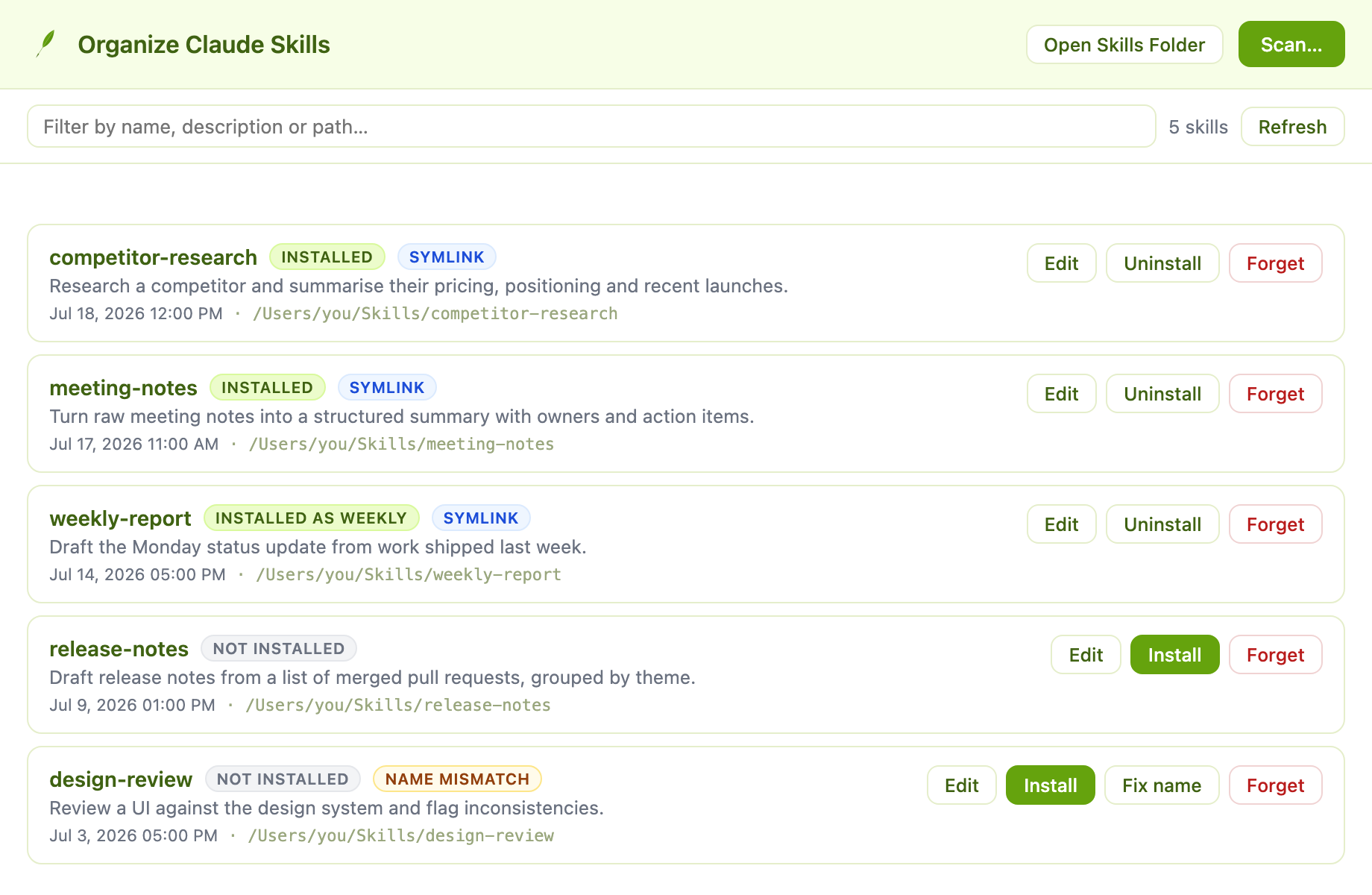
Scan a chosen folder, your home directory, or the whole drive. EddyTor remembers what it finds, so your catalogue is still there next time.
One click links a skill into ~/.claude/skills. No copying files by hand, no ln -s, no wondering whether it worked.
Open any skill straight into the editor. If it is already installed, EddyTor asks whether you mean the installed copy or the original file.
When a skill's folder and its name: disagree, EddyTor flags it — and can rewrite the frontmatter to match in one click.
A true WYSIWYG editor — see headings, bold, and lists as you type. Markdown mode is one click away when you want it.
Insert tables (with merged cells), UML diagrams, charts, and syntax-highlighted code blocks.
A real desktop app, not a browser tab. Fast, distraction-free, and works with no internet.
Double-click any Markdown or skill file and it opens in EddyTor. Save with ⌘S like any app.
Find every skill on your machine, see which are installed, and install or edit them without the terminal. See how.
A calm interface that's easy on the eyes, with a built-in dark mode for late-night edits.
A native app with a familiar menu bar and keyboard shortcuts, available for both macOS and Windows.
| Plan | Price | Seats |
|---|---|---|
| Starter | $0 | 1 |
| Team | $29 | 5 |
| Business | $99 | Unlimited |
function summarize(text) {
  return text.slice(0, 280);
}
Download the app for your Mac or Windows and open it.
Open any .md skill file — or paste your content into a new document.
Make changes visually, then save back to a clean Markdown file Claude can read.
Free for everyone — no account, no subscription. Native builds for macOS and Windows.
Built on the open-source TOAST UI Editor.